By the end of this hands-on guide you will have evaluated, selected, and prepared for effective video therapy sessions tailored to virtual psychology and women’s therapy. Expect initial technical setup and therapist selection to take 2–4 hours; meaningful clinical progress typically requires 6–12 weekly sessions. This guide assumes beginner–intermediate digital skills and readiness to engage in guided mental health work.
Introduction to Video Therapy
This section defines video therapy (also called teletherapy or telehealth counseling) and situates it within modern mental health services. Video therapy uses secure, HIPAA-aware video platforms to recreate the therapeutic encounter: scheduled virtual sessions, assessment, goal setting, and ongoing treatment plans delivered through live video between a licensed clinician and client.

Video therapy can be delivered as individual sessions, couples work, or group therapy formats; it often mirrors in-person care in therapeutic goals but differs in logistics, privacy considerations, and platform features. According to a 2024 industry report, remote mental health appointments rose over 40% since 2020, reflecting widespread adoption (source type: industry report).
When you’re ready to explore broader virtual offerings, see Online family therapy and counseling services with virtual options for multi-person and family-focused digital services.
Before you start
- Device: laptop or tablet with webcam (minimum: 2 GHz CPU, 4 GB RAM).
- Internet: stable 10 Mbps download / 2 Mbps upload recommended for HD video.
- Software: updated browser or the provider’s app; ensure camera/microphone permissions enabled.
- Private space: a quiet, well-lit room where you can speak confidentially for 50 minutes.
- Documents: photo ID, insurance info, list of medications, and an emergency contact.
Core steps: a practical, step-by-step workflow
- Choose the right platform and verify security. Confirm the provider uses a HIPAA-aware platform (end-to-end encryption or equivalent). Ask for the platform name, support contact, and a written privacy policy. If you prefer common tools, check availability of Zoom or platform-specific apps; many clinics provide a secure portal rather than public apps.
- Confirm licensing and scope of care. Ask whether the therapist is licensed in your state and authorized to practice across state lines when relevant. Get explicit answers about treatment scope (e.g., CBT, trauma care, medication management) and whether referrals are made for higher-risk needs.
- Schedule an intake and technical test call. Book a 15-minute tech-check appointment before your first full session to test camera, mic, internet, and lighting. Confirm appointment length—typical individual sessions are 45–55 minutes; couple work often runs 60–90 minutes.
- Complete intake paperwork and consent forms online. Fill out intake forms, symptom scales (PHQ-9, GAD-7 when applicable), and telehealth informed consent; retain copies. Consent should state emergency procedures, confidentiality limits, and platform risks in writing.
- Set up your physical environment for therapy. Use neutral background, face a window or soft light, sit 2–3 feet from the camera for natural framing, and eliminate background noise (headphones with mic are strongly recommended).
- Start with collaborative goal setting. In session one, create 2–3 measurable goals (example: reduce panic frequency from 4 to 1 episodes/week within 12 weeks). Agree on check-ins and homework, and request a written treatment plan if helpful.
- Use evidence-based modalities suited for video. Confirm your therapist uses modalities proven online (CBT, trauma-informed care, acceptance and commitment therapy). For medication-assessment integration, ask about coordinated care or referrals to psychiatric telehealth providers; see online anxiety and depression treatment options.
- Create session routines and homework practices. Agree on a start ritual (5-minute mood check), use shared documents for homework, and schedule consistent weekly slots; consistency improves outcomes. Track progress with symptom scales every 4–6 weeks.
- Plan for crisis and technical failures. Confirm emergency contacts, the therapist’s local backup plan, and a fallback contact method (phone). If video fails, agree to continue by phone for that session and reschedule as needed.
- Review insurance, fees, and sliding-scale options. Verify in advance whether sessions are covered, co-pay amounts, and cancellation policies. If budget is a concern, ask about low-cost community telehealth or free therapy online options.
- Commit to 6–12 sessions as an initial trial period. Many clients see measurable symptom change within 6–12 sessions; track progress and reassess goals at session 6.
- Plan ongoing care and referrals. If additional services are needed—group therapy, psychiatry, or specialty trauma care—request coordinated referrals and warm handoffs from your therapist.
Common mistakes and how to avoid them (from my practice)
I once observed a client assume any video call is secure; they used a public platform without encryption and later felt unsafe sharing trauma details. Always verify encryption and written privacy policies in advance. I also saw clients skip a tech-check and lose a session to browser permissions—do the 15-minute test call.
Quick checklist before your first full session
- Privacy: confirmed private room and headphones.
- Tech: camera, mic, and internet test passed (15-minute check).
- Paperwork: intake and consent forms completed and saved.
- Plan: 2–3 treatment goals set with expected timeline.
- Backup: therapist emergency plan and phone fallback confirmed.
When to call in a professional instead of relying solely on video therapy
If you or someone you care for is actively suicidal, homicidal, experiencing psychosis, or unable to keep themselves safe, call emergency services or present to the nearest emergency room. Video therapy is not appropriate as sole care for immediate high-risk situations; your therapist should provide clear crisis pathways.
Transitioning now from practical setup to deeper clinical and user-experience questions below.
How Video Therapy Works in Virtual Psychology
In virtual psychology, video therapy replicates key elements of clinical practice—assessment, therapeutic alliance, intervention, and progress measurement—while relying on digital tools for delivery and documentation. Core components include secure video platforms, scheduling/booking systems, electronic health records (EHR), and asynchronous messaging for between-session support.
Typical how-to flow:
- Referral/intake: Client completes online intake; clinician reviews history and risk.
- Assessment session: Structured clinical interview via video; baseline measures collected.
- Treatment planning: Shared decision-making to choose modalities (e.g., CBT, trauma-informed care) and session cadence.
- Regular sessions: 45–60 minute video sessions with homework and symptom tracking.
- Progress review: Outcome measures every 4–8 weeks to adjust interventions.
Technology integrations commonly used by clinicians: calendar integrations, secure document signing, session note templates, and outcome measurement dashboards. Clinician walkthroughs show most providers allow clients access to appointment scheduling, payment portals, and secure messaging within the patient portal—these reduce administrative friction and increase engagement.
For rapid support and medication coordination, many clinics partner with telepsychiatry services; these provide evaluations and prescriptions when clinically indicated. For integrated care options, explore the linkage to online anxiety and depression treatment options. If same-day access matters, check whether your provider offers same day therapy services.
According to a 2024 industry report, teletherapy modalities reporting equivalent patient satisfaction to in-person care exceeded 70% in routine mood and anxiety disorders (source type: industry report). Transition: next, we’ll examine considerations unique to women seeking therapy via video.
Video Therapy Specifically for Women’s Therapy
Video therapy offers flexibility for women balancing caregiving, work, and health needs, and enables access to clinicians with gender-specific expertise regardless of geography. Women’s therapy often addresses reproductive mental health, perinatal mood disorders, trauma, body-image concerns, and gendered stressors; many of these interventions translate well to live video using trauma-informed, culturally competent approaches.
Clinical examples (anonymized):
- Case A: A new mother with postpartum anxiety used weekly video CBT and symptom tracking; PHQ-9 dropped from 15 to 7 in eight weeks with coordinated pediatrician communication.
- Case B: A trauma survivor accessed a clinician specializing in EMDR-adapted protocols for telehealth and completed stabilization phases over 12 sessions before in-person EMDR was recommended.
“Building trust through the screen requires predictable structure, explicit consent, and empathic pacing—especially when working with trauma,” a licensed clinical psychologist observed in a 2023 clinician interview (source type: professional interview).
Therapeutic modalities adaptable to video include CBT, exposure work, mindfulness-based therapies, and trauma-informed care. For clients specifically seeking structured interventions, consider online CBT resources. For women presenting with social anxiety, hybrid or virtual group formats can help generalize skills; see social anxiety therapy online.
Special considerations for women’s therapy via video:
- Perinatal privacy: schedule when partner or family are occupied; ensure audio privacy when discussing sensitive medical details.
- Trauma-informed pacing: emphasize grounding skills and shared safety planning in the first sessions; ask for consent to record clinical notes or sessions explicitly.
- Accessibility: offer short-session options (25–30 minutes) for clients with childcare constraints.
For specialized trauma pathways, clinicians may refer to trauma-informed virtual therapy. Transition: after clinical fit, you’ll want a clear view of benefits and challenges to decide if video therapy suits your needs.
Benefits and Challenges of Video Therapy
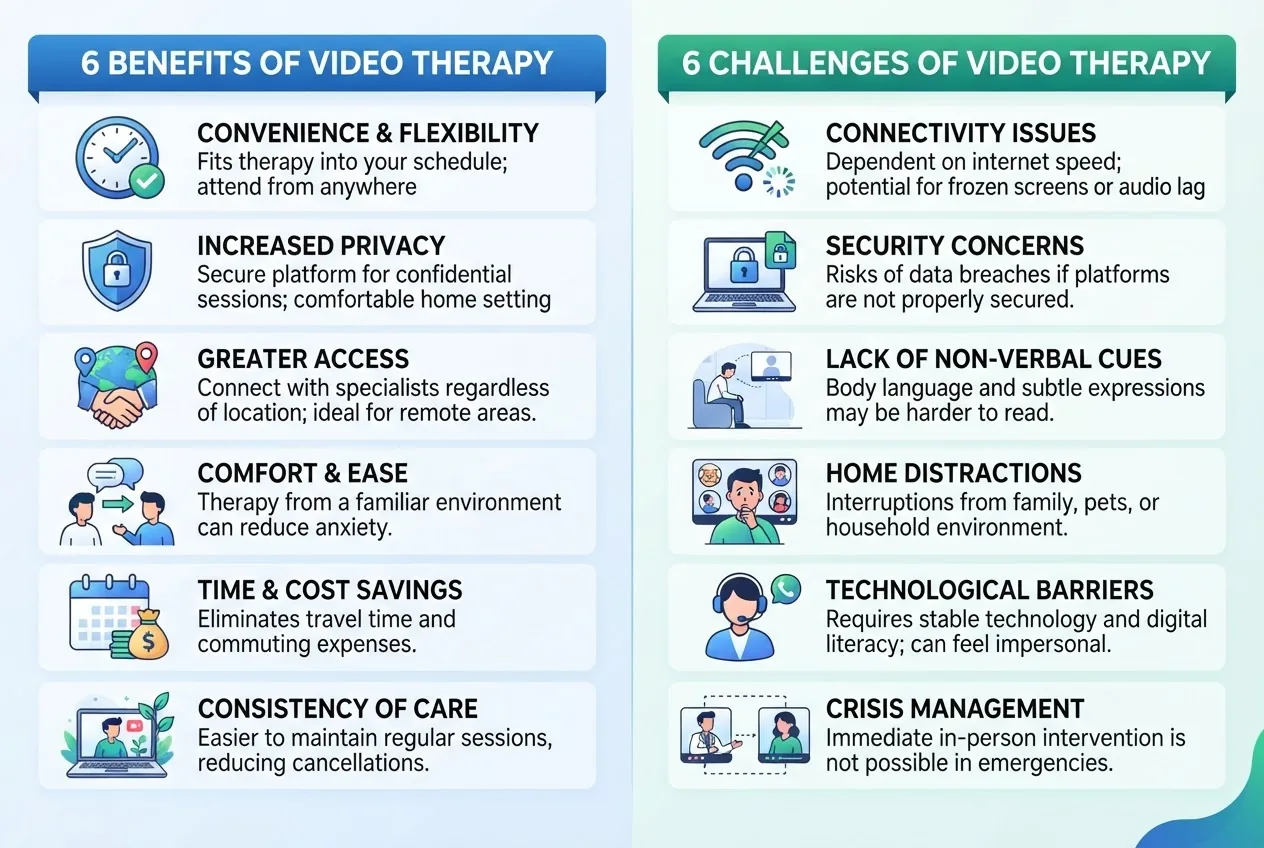
- Benefits
- 1) Increased accessibility: Video therapy removes travel barriers, helpful for rural clients and those with mobility limits.
- 2) Convenience and time savings: reduces commute time; ideal for busy schedules and new parents.
- 3) Expanded provider choice: access clinicians with gender-specific expertise not available locally.
- 4) Continuity of care: easier to maintain weekly sessions during travel or relocation.
- 5) Cost options: lower overhead sometimes leads to reduced fees, and there are free therapy online options and affordable telehealth providers.
- 6) Diverse formats: one-on-one video, online group therapy sessions, and brief check-ins provide flexible care models.
- Challenges
- 1) Privacy concerns: home environments may not be private; clinicians must implement clear confidentiality planning.
- 2) Technology reliability: dropped calls or poor video quality can interrupt clinical flow.
- 3) Clinical limits: certain high-risk presentations may require in-person or higher-acuity care.
- 4) Licensing constraints: interstate practice limitations can limit provider options.
- 5) Insurance coverage variability: not every insurer or plan covers teletherapy equally.
- 6) Therapeutic nuance loss: some nonverbal cues can be muted over video, requiring therapists to check in more frequently.
For budget-conscious clients, explore free therapy online options and sliding-scale clinics. For clients who prefer in-person rituals, weigh the trade-offs in the comparison section below. Transition: the next section describes the technology and privacy practices clinicians should follow.
Technology and Privacy Considerations
Privacy and security are central to safe video therapy. HIPAA (Health Insurance Portability and Accountability Act) sets U.S. expectations for protected health information (PHI); HIPAA-compliant practices include signed Business Associate Agreements (BAAs) and encrypted data channels.
Key security features to verify:
- End-to-end encryption or TLS encryption for video streams.
- Unique meeting IDs and waiting-room controls to prevent unauthorized access.
- Role-based access to EHR and session notes.
- Secure messaging with message expiration options.
- Encrypted storage of session recordings (if used) with strict retention policies.
Practical privacy tips for clients:
- Use a private Wi‑Fi network; avoid public hotspots when possible.
- Confirm that your clinician has provided a telehealth consent form explaining limits of confidentiality.
- Ask whether session notes are stored in a HIPAA-compliant EHR; request a BAA if your plan requires it.
- Keep your device OS and browser up to date and use headphones to ensure audio privacy.
Professional standards and guidance are available from the American Psychological Association; see their telepsychology resources for best practices APA telepsychology guidance (source type: professional association resource).
Clinics sometimes reference HIPAA guidance directly; for consumer-facing explanations of HIPAA and telehealth rules see the U.S. Department of Health and Human Services HIPAA information (source type: government guidance). Transition: the following section gives concrete tips to maximize session success.
Tips for Maximizing Success in Video Therapy Sessions
Follow these steps every session to increase engagement and outcomes. For flexible scheduling or on-demand models, consider providers offering asynchronous messaging and flexible blocks; see on-demand therapy services.
- Prepare 15 minutes early. Close unrelated tabs, ensure notifications are off, and join the video call 5–10 minutes early to avoid last-minute issues.
- Create a consistent start ritual. Use a 3–5 minute grounding routine (breathing, brief journal entry) to bring focused presence to the session.
- Set clear session goals. State 1–2 items you want to address in the session so time is used efficiently.
- Use in-session sharing tools. Share screens for worksheets, or email brief homework links to your therapist before the session.
- Manage distractions proactively. Put children/pets arrangements in place, mute secondary devices, and use headphones.
- Use outcome measures. Complete PHQ-9 or GAD-7 before check-ins every 4–6 weeks to monitor change.
- Follow up with written summaries. Ask for brief session notes or a follow-up email with 2–3 action steps and homework.
- Schedule your next appointment before logging off. This reduces no-shows and maintains momentum; flexible providers often offer teletherapy with flexible appointments.
- Handle tech interruptions calmly. If video fails, switch to phone; always confirm an alternate contact method during intake.
Transition: now compare video therapy against traditional in-person therapy to help you choose the best fit.
Comparing Video Therapy to Traditional In-Person Therapy
| Feature | Video Therapy | In-Person Therapy |
|---|---|---|
| Accessibility | High—no travel required | Limited by location and mobility |
| Nonverbal cues | Some cues reduced; requires explicit checking | Full range of body language and proximity cues |
| Crisis management | Requires clear local backup plans | Immediate in-person escalation available |
| Cost | Often lower overhead; more sliding-scale options | Potentially higher due to office costs |
| Therapeutic fit | Strong for mood/anxiety/CBT; mixed for complex high-risk needs | Preferred for severe psychiatric conditions or when physical presence helps |
Summary: Outcomes for common disorders (mild–moderate depression, generalized anxiety) are comparable across formats when clinicians use evidence-based protocols and reliable technology. According to a 2024 industry report, patient-reported outcomes for online CBT showed parity with in-person CBT for many clients (source type: industry report). Transition: next, specific guidance on selecting a therapist.
Finding the Right Virtual Therapist for Women’s Therapy Needs
Selecting the right clinician involves credential checks, specialization matching, and cultural competence. Look for clinicians with specific experience in women’s mental health domains: perinatal care, trauma, reproductive mental health, and body-image work.
Use this checklist when vetting clinicians:
- Licensing: verify state license and active status; ask where the clinician is licensed to practice.
- Specialization: request details on experience with women’s issues and evidence-based modalities.
- Cultural competence: ask about experience with your background (race, sexual orientation, religion).
- Insurance and payment: confirm fee, cancellation, and whether they accept your plan.
- Practical fit: availability, session length, platform, and pain points.
- Reviews and referrals: read patient reviews and ask for professional referrals if needed.
If you want in-person-like credential checks or regional options, look for licensed online therapists in your area and consult a therapist websites guide to compare bios and specialties. If spiritual alignment matters, research faith-based counseling options.
Transition: finally, understand the legal and licensing landscape that shapes virtual practice.
Overview of Legal and Licensing Considerations in Virtual Video Therapy
Licensing rules vary by state and country. Clinicians must follow their licensing board’s telehealth regulations; interstate practice often requires multi-state licensure or temporary waivers depending on jurisdiction.
Key legal issues to ask your provider about:
- Where the clinician is licensed and whether they can legally treat clients in your state.
- Informed consent for telehealth that documents risks, benefits, and confidentiality limits.
- Documentation and record-keeping policies consistent with professional standards.
- Insurance and reimbursement: ask whether the clinician takes Medicare or Medicaid when applicable; see Medicare-covered online therapy and insurance-covered virtual therapy.
- Liability insurance: confirm therapist malpractice coverage includes telehealth.
For country- or state-specific regulations consult government and professional resources; for U.S. policy overviews see the CDC or NIMH for mental-health related data and guidance. For example, NIMH provides prevalence and care utilization data relevant for planning (source type: government mental health organization): National Institute of Mental Health (NIMH).
Transition: below are closing steps and next actions to start video therapy safely and effectively.
Conclusion and Next Steps for Starting Video Therapy
Key takeaways: video therapy is an effective, accessible modality for many women’s mental health needs when delivered via secure platforms and evidence-based protocols. Start by verifying licensing, performing a 15-minute tech-check, and committing to an initial 6–12 session plan with measurable goals. If cost is a barrier, pursue free or low-cost telehealth providers and sliding-scale clinics.
Next steps: schedule a technical test call (15 minutes), confirm written telehealth consent, and set your first clinical goal. If you’d like guided options, return to the practical checklist above and use the resources linked throughout this guide to compare clinicians and platforms.
Ready to begin? Book your intake, prepare your space, and bring one concrete goal to your first session—reducing symptom frequency or improving daily functioning are practical starting points.